Home / Statistical Tools / QFD, FMEA, & Pugh / Pugh / Tutorial / Step 4 - Enter Weights
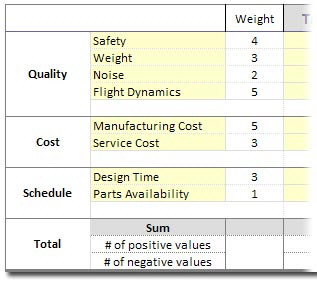
Step #4 -- Enter the weights for each decision criteria
Weights allow you to scale the importance of decision criteria. For example, a weight of 4 is twice as "Important" as a weight of 2. If you are in the very early stages, you can omit the weights or set all their values to 1.
Tips for setting weights:
-
If you choose to use weights, agree on the scaling before you complete the remainder of the matrix.
-
Use available data from the Identify phase, to include VOC and VOB data.
-
Consider the group weights of Quality, Cost, and Schedule. The group weights are the sum of the criteria weights within a group. This ensures that a particular group will not tip the scale too far in one direction.
Completed Weights:
Next step: Step #5 -- Compare each of the alternatives to the baseline concept
Previous: Step #3 -- Enter the decision criteria