Home / Statistical Tools / Control Charts / Control Chart Wizard
Control Chart Wizard
From Excel click...
QXL Stat Tools Tab > Control Charts > Control Charts Wizard
The Control Chart Wizard will step you through the process of selecting the correct control chart.
Continuous or Count Data
Continuous data can be measured on some form of a scale. Continuous data can be expressed with decimals. For example, the voltage may be 5.132 volts.
Count data can typically be in one of three forms:
Binomial -- Only two possible values, the most common of which is Pass/Fail.
Nominal -- Similar to Binomial, except that there can be more than two possible values. For example, a defect status could be "No Defect", "Cracked", or "Chipped".
Ordinal -- Ordinal data is often confused with continuous. Ordinal data has scale, but fractions are not possible.
Subgroup Size
When creating a control chart, selecting the subgroup size is important. Select a subgroup size that allows rational subgrouping. A Rational Subgroup is "a sample in which all of the items are produced under conditions in which only random effects are responsible for the observed variation."(Nelson, Lloyd S. "Control Charts: Rational Subgroups and Effective Applications," Journal of Quality Technology. Vol. 20, No. 1, January 1988.)
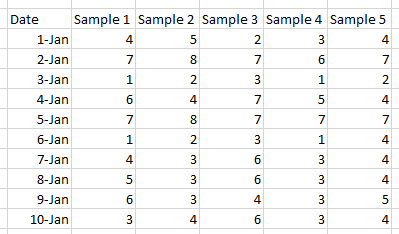
The following data has 10 subgroups of size 5. In this example, the subgroup size is constant with n=5. Note that if the dates continued past the 11th of January, the sample size or n would still be equal to 5.
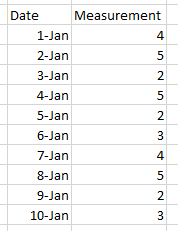
In some cases, it doesn't make sense to have subgroups greater than 1. For example, when a process is very slow, it may take too much time to wait for sample sizes of 5. Any time when rational subgrouping can't be used, it may be appropriate to use a subgroup size of 1. The following data is an example of a subgroup size equal to 1 (n=1).
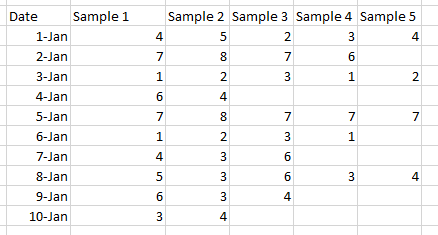
In other cases, it may not be possible to have a constant subgroup size. The following example has variable subgroup size.
Single or more than one defect per unit
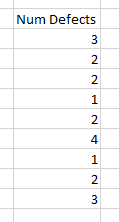
One Defect Per Unit (defective) -- If a unit is binomial, that is only two possible outcomes pass/fail, then it would fit into this category.
Multiple Defects Per Unit -- If a unit can have more than one defect, then it falls into this category.
In many cases, you can collect the data both ways. Take for example the process of inspecting the surface of a desk. If your inspection results in Pass/Fail, then it would be "One Defect per Unit". However, if you counted the number of blemishes on the surface, then it would be "Multiple Defects Per Unit".
Is the sample size constant?
If the sample size never changes, then answer Yes to this question.
Example of variable sample size...
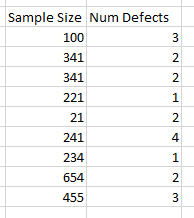
If the sample size doesn't change, then you will only need to provide one column of numbers. For example, if the sample size was always 100, you might want to use this format...
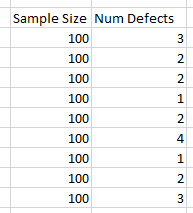
However, the Sample Size column is no longer required. Instead, use this format...