Home / DOE / Create Designs / Box-Behnken Designs
Box-Behnken Designs
From Excel click...
QXL DOE Tab > Create Design > Create Box-Behnken Design
Box-Behnken Designs can be created by selecting QXL DOE Tab > Create Design > Create Box-Behnken Design.
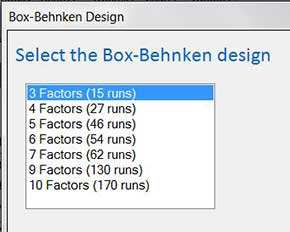
Select the Box-Behnken design
Selecting the number of factors in the design will choose the appropriate Box-Behnken design.
Enter Factor Names and Coding
The Box-Behnken Design is not compatible with Categorical (qualitative) variables. Therefore, when entering the factor names and coding, all inputs are assumed to be Quantitative.
Factor name: Enter a unique name for the factor. Make the name short but descriptive. For example, use "Temp" instead of "Temperature" as it will make reading the results in the regression table easier.
Levels: Enter the Low and High values for each variable. For example, if you would like to experiment with temperature from 100 to 200 degrees, replace -1 with 100 and +1 with 200.
Define Outputs (responses)
Click here for more information...
Enter the number of center points
You can change the default number of center points to any value if desired.
Enter number of replicates and number of blocks
Replicates: Choose the number of replicates for your design.
Select number of blocks: Based on the design and number of replicates, Quantum XL provides you with all the options available.
Note that blocking can be either in replicates or in design. For more information, see the section on blocking.