Home / Monte Carlo / Additional Tools / Scorecard
Scorecard
From Excel click...
QXL Monte Carlo Tab > Scorecard > New Scorecard
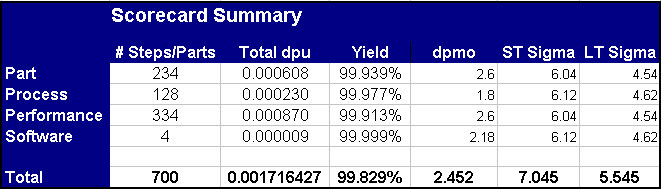
To create a new product scorecard, select QXL Monte Carlo Tab > Scorecard > New Scorecard from the menu. The product scorecard is divided into five sections: Part, Process, Performance, Software, and Total. An example of the part scorecard is below:

For each item in a scorecard you can define dpu in one of three ways:
-
You can define the mean, standard deviation, and spec limits.
-
You can define the sample size and number defective.
-
You can enter a historical ppm rate.
The Part, Process, Performance, and Software scorecards "roll up" to the total scorecard. An example of the total scorecard is below.