Home / Statistical Tools / MSA / MSA Stacked Data Source
MSA Stacked Data Source
The data source for a Measurement System Analysis can be in either stacked format or in a MSA Template. This help topic covers stacked format. Below is an example of data in stacked format.
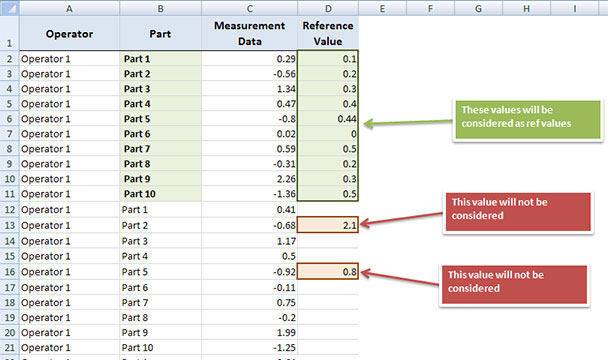
Three columns are required for the MSA: Operators (Appraisers) column, Parts column and Measurement Data column. Reference values column is optional.
-
The data for Operators and Parts can be numerical, text, or a combination of both.
-
The Measurement Data column must be all numerical. Empty cells are not allowed.
-
You must have at least two parts.
-
If there are N parts, only first N observed reference values will be used. If there are more than N reference values, they will be ignored.
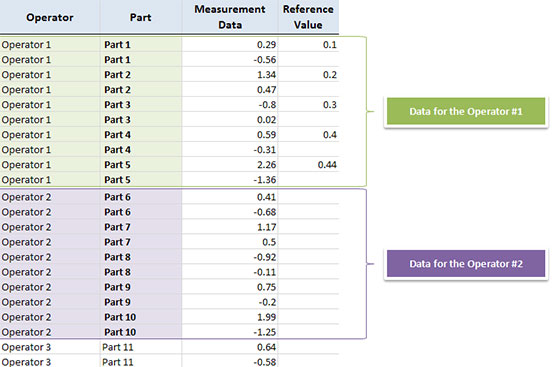
For the Nested ANOVA analysis, the part names doesn't have to be equal between operators. In the example below, part names for Operator #1 are from "Part 1" to "Part 5", while for Operator #2 part names go from "Part 6" to "Part 10". This works only for the Nested ANOVA. Crossed MSA analysis (ANOVA or XbarR) does not support this data format.
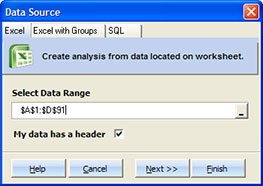
Step #1
Start ANOVA or XbarR, and select the data range that contains Operators, Parts, Measurement Data and Reference Values columns.
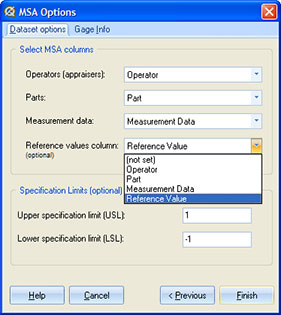
Step #2
Assign a column to each MSA Factor and enter specification limits.
Step #3
Enter Gage info. This step is optional.
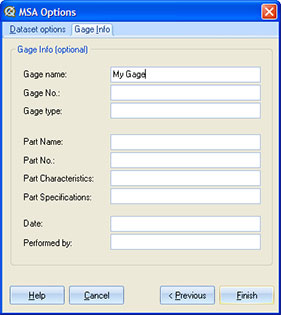
After you click 'Finish', Quantum XL will create a results sheet with MSA Statistics.