Home / Statistical Tools / QFD, FMEA, & Pugh / Pugh / Create And Modify / Sort Pugh
Sort Pugh
From Excel click...
QXL Stat Tools Tab > Pugh > Sort
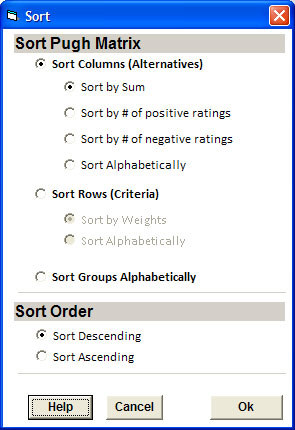
The Pugh Matrix can be sorted by columns, rows or groups.
Sort Columns (Alternatives)
Sorting by columns allows you to reorder the alternatives (columns). You can sort ascending or descending using four different criteria.
-
Sort by Sum: Sort by the total sum for each of the alternatives. Sort by sum is the most common method, as the alternative with the greatest sum tends to be the most favorable alternative.
-
Sort by number of positive ratings: Sort by the number of positive ratings in the column. The alternative with the most positive ratings may be desirable for reference even if the sum is not the greatest.
-
Sort by number of negative ratings: Sort by the number of negative ratings in the column.
-
Sort Alphabetically: Sort by the text in the row "description".
Sort Rows
Sorting by rows gives you the flexibility to change the order of the criteria within a group by sorting by weight or alphabetically.
-
Sort by Weights: Sort the criteria by the weight.
-
Sort Alphabetically: Sort the criteria alphabetically by name.
Sort Groups Alphabetically
Sorting groups gives you the ability to put the groups in alphabetical order.
- Alphabetically: Sort the groups alphabetically by name.