Home / Statistical Tools / Hypothesis Tests / Tests For Mean / Two-way ANOVA Nested
Two-way ANOVA (nested)
From Excel click...
QXL Stat Tools Tab > Hypothesis Tests > Tests for Mean > Two-way ANOVA (nested)
| Test type: | Mean |
|---|---|
| Data: | Quantitative |
| Number of Variables: | 2 |
| Number of Groups: | 2 or more |
| Assumptions: | Normally distributed samples with equal variance |
Two-way ANOVA (nested) is a hypothesis test used to compare means when the data has been classified by two variables (factors).
You can use a Two-way ANOVA (nested) when the following conditions are met:
-
Samples are independent.
-
Populations are normally distributed.
-
Population variances are equal.
If the data doesn't have equal variance, consider multiple two-sample t-Test assuming unequal variance.
There are two sets of hypotheses:
-
The population means of the first factor are equal.
-
The population means of the second factor are equal.
Step #1: Select data source for two-way ANOVA (nested).
Data for the two-way ANOVA (nested) can come from an Excel spreadsheet, SQL data source, or it can be entered manually.
See source data formats and example data for the two-way ANOVA.
Step #2: Options.
-
'Decision Criteria' option (default = 0.05). The value of the decision criteria (significance or α level).
-
'Show Box plot' options. Display box plot along with hypothesis results.
-
'Display mode' option. When the 'Verbose (long)' option is on, Quantum XL will display additional text that explains the hypothesis test results.
Example
Six testers from three different geographic locations tested if there is a difference in web page load time.
Since testers didn't change location during the tests, the design is nested-- each tester belongs to only one location.
-
Open two-way ANOVA worksheet.
-
Run Quantum XL > Hypothesis Tests > Tests for Mean > Two-way ANOVA (nested).
-
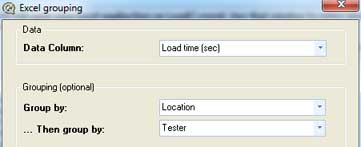
Select 'Group By' data source, and select columns for 'Data', 'Group By' and '...then group by' fields:
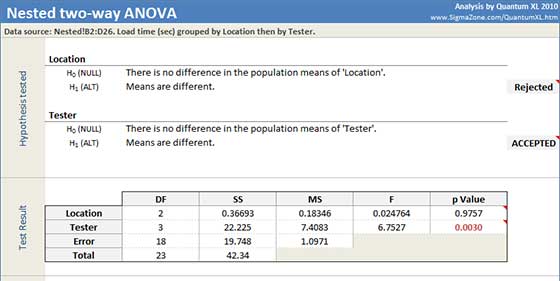
Quantum XL will display the ANOVA table. For each hypothesis set, Quantum XL will mark the alternative hypothesis as Rejected or Accepted, based on the p Value from the ANOVA table:
-
Location: p-Value = 0.9757. Since it is greater than the decision criteria (0.05), the null hypothesis cannot be rejected. We cannot conclude that the means are different for Factor 'Location'.
-
Tester: p-Value = 0.0030. Since it is less than the decision criteria (0.05), the null hypothesis can be rejected. We can draw the conclusion that the means are different for Factor 'Tester'.
Update
Two-way ANOVA is updatable. After you create a two-way ANOVA analysis, you can change its data source or add new data to the data source and simply update the analysis.
-
Update: Quantum XL > Statistical Tools > Update Sheet
-
Change settings: Quantum XL > Statistical Tools > Modify Chart/Analysis